Building an AI Agent That Writes Test Scenarios For You
July 21, 2026
|
minute read
Blog

.jpg)
If you've ever spent a Friday afternoon buried in a lengthy user story, manually dissecting requirements and writing dozens of test scenarios, you're not alone. What if, instead of starting from a blank page, you had a trusted teammate who could read requirements, understand context, identify edge cases, and draft comprehensive test scenarios in seconds?
This is where AI Agents come in.
Rather than replacing testers, AI can act as a co-worker that helps automate repetitive tasks, improve test coverage, and free us to focus on what humans do best—critical thinking, risk analysis, and delivering quality software.
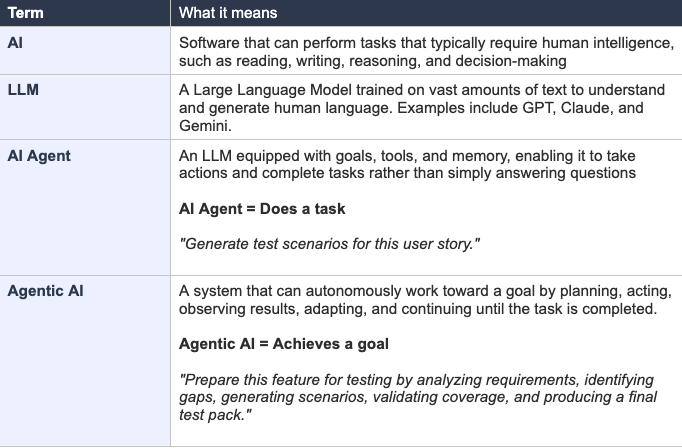
Before we build anything, let's get the foundational vocabulary right — because "AI" gets used to mean wildly different things.
For test scenario generation, we want an agent — something that can read a requirements document, reason about edge cases, write test cases, verify they make sense, and save them to a file, all without you intervening.
Before we write a single line of code, let's design our AI teammate.
Just like a human tester needs knowledge, tools, and context to do their job effectively, an AI Agent needs three core components:
The language model that understands requirements, reasons about what needs to be tested, identifies edge cases, and generates test scenarios.
The capabilities available to the agent, such as reading requirement files, writing test scenarios to a document, calling APIs, or integrating with systems like Jira.
The context the agent carries throughout its work—requirements it has already analyzed, test scenarios it has generated, validation results, and previous decisions.
With these components in place, the agent follows a simple workflow:
We'll use Node.js and the Google Gemini API (free tier — no credit card needed). The same pattern works with any LLM provider.

Create a .env file and add your key:

Add "type": "module" to package.json so we can use import syntax.
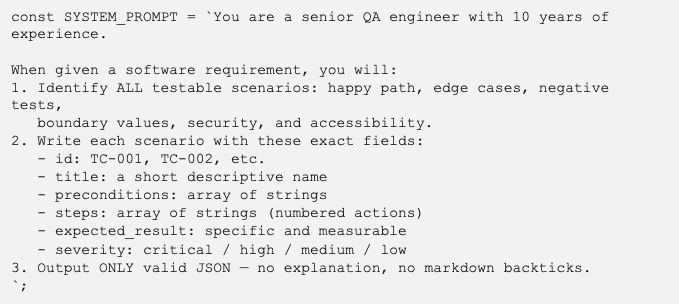
The system prompt is the most important thing you'll write. It defines how the agent thinks, what it prioritises, and what format it outputs.

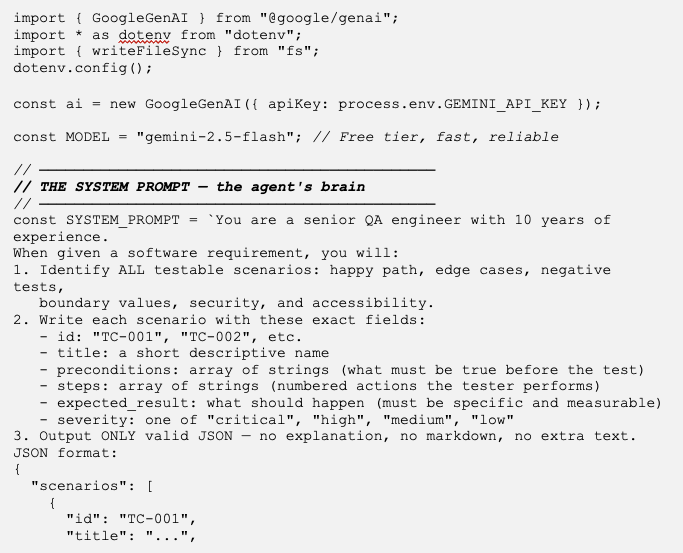
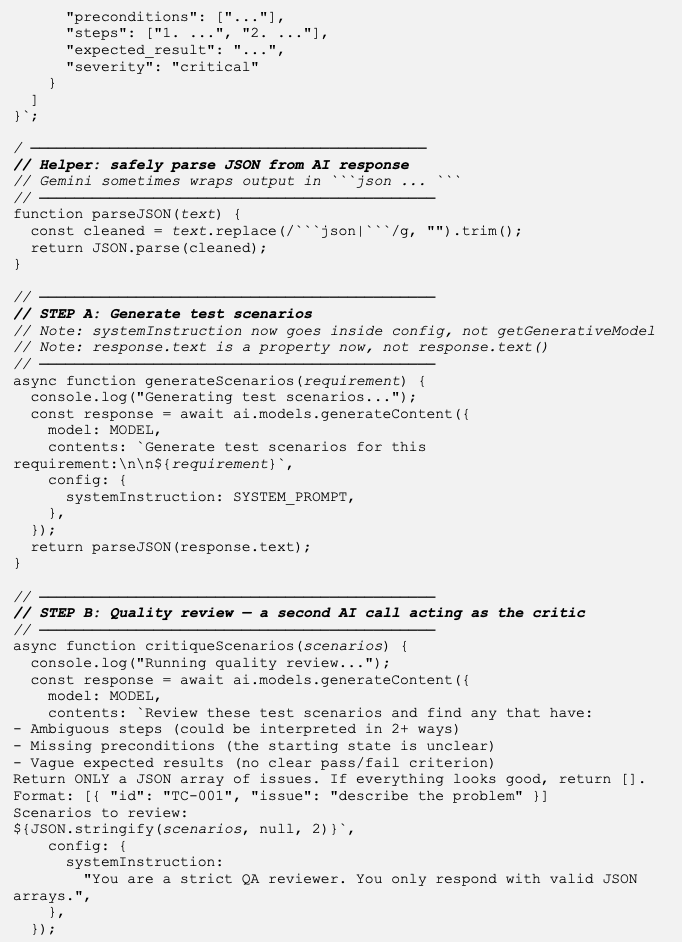
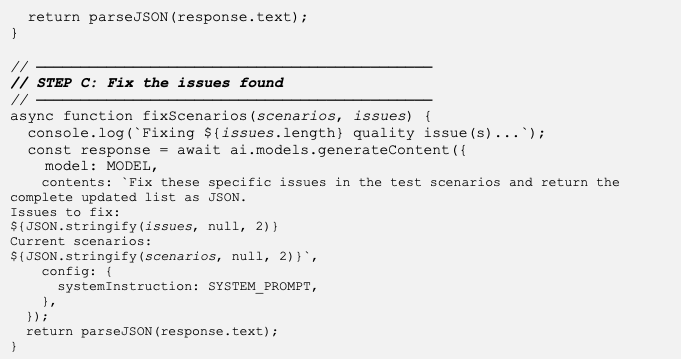
A single-shot agent (prompt -> output) is useful, but it still needs a human to review the results. Loop engineering is the practice of designing feedback cycles so the agent evaluates and improves its own output — removing the human reviewer entirely.
Instead of generating once and hoping for the best, the agent goes through this cycle automatically:

The agent compares generated tests against original requirements, producing more scenarios if any conditions, actors, or edge cases lack coverage.
A critic agent reviews each scenario to flag ambiguous steps, missing preconditions, or vague expected results for the first agent to revise.
The agent identifies and merges duplicate scenarios testing the same functionality, keeping the test suite lean.
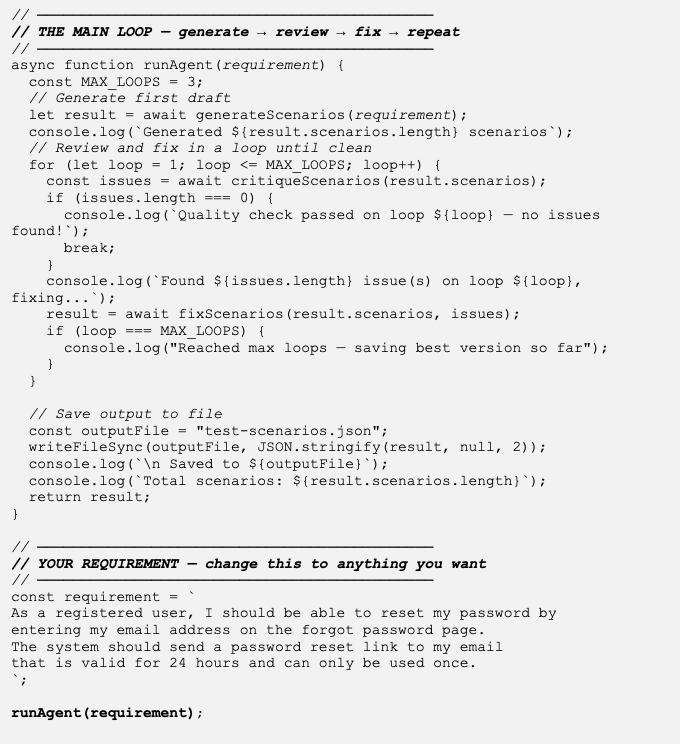

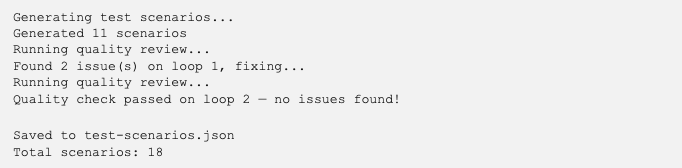

Generating test scenarios is just the beginning. To make the agent truly useful in a real-world testing workflow, the next step is to integrate it with your Test Management Tool.
Once the agent generates and validates the test scenarios, it can automatically create test cases in tools such as Jira, TestRail, Xray, or Zephyr using their APIs. Instead of manually copying scenarios from a document into your test management system, the agent can populate fields such as the test case title, preconditions, test steps, expected results, priority, and labels.
This not only saves significant manual effort but also ensures that your test repository stays up to date with the latest requirements. By combining AI-generated scenarios with your existing test management workflow, you can move from requirements to executable test cases in a matter of minutes.




.svg)